

Data is cached on your devices and updates are fetched either ręcznie lub automatycznie w tle.
Szybkie łącza #
Ręczne aktualizacje danych #
If you pull down to refresh (iPhone/iPad and Android apps) or click the refresh button (Web app) on the product, order or customer lists, FooSales will perform a quick check to see if there have been any updates in WooCommerce to products or orders since the last time you manually refreshed the lists. Any new orders and updates to products or orders will automatically appear in the app and they will be cached on your device. Uwaga that only newly registered customers will be fetched with background data updates. Any changes made to existing customers from your WordPress admin dashboard or through other devices running FooSales POS will only appear on your device when resetting locally stored data.
Automatyczne aktualizacje danych #
Jeśli chcesz, aby aktualizacje były pobierane okresowo w tle podczas korzystania z aplikacji, możesz włączyć tę funkcję, określając częstotliwość, z jaką FooSales ma sprawdzać dostępność aktualizacji. Jeśli otworzysz aplikację Ekran ustawień W aplikacji znajduje się suwak, za pomocą którego można kontrolować częstotliwość aktualizacji w tle.
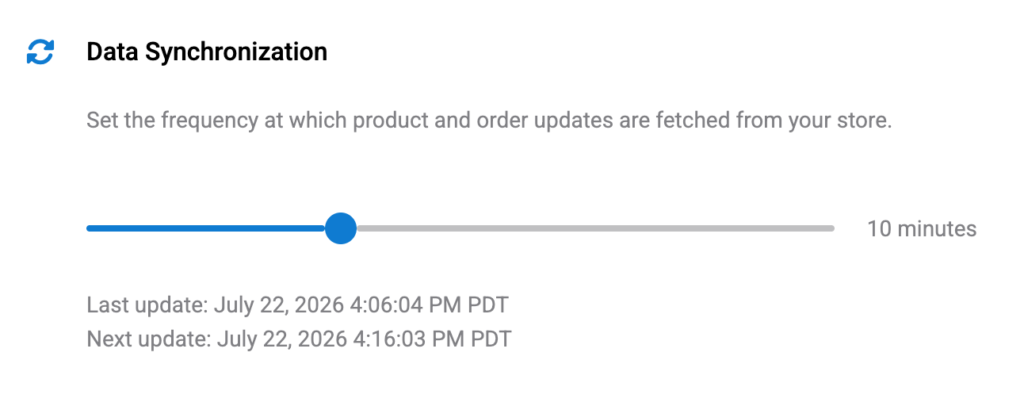
Ustawienie suwaka na minimalną wartość 0 minut (zero) will disable automatic background updates. In this scenario, the only way to fetch updates would be the manual method explained above by pulling down to refresh (iPhone/iPad and Android apps) or clicking the refresh button (Web app) on the product, order or customer lists.
Please note that if you minimize or close the FooSales app, the background data updates will be zawieszony aby zapobiec niepotrzebnemu zużyciu baterii i danych. Po przywróceniu lub ponownym otwarciu aplikacji na tablecie aktualizacje w tle zostaną wznowione. Kontrola aktualizacji jest przeprowadzana, gdy tylko aplikacja stanie się ponownie aktywna po połączeniu ze sklepem, a następnie kolejne kontrole będą przeprowadzane z określoną częstotliwością.
Resetting Locally Stored Data #
If you want to clear all cached data on your device and redownload the latest data, you can do so simply by tapping the Reset na przycisku Ustawienia screen to remove all locally stored data and redownload your store data. This might take a few minutes and you won’t be able to use the app until the process is complete. After this FooSales will store the data locally on the device again.

 English
  German
  Dutch
Dutch  Spanish
  Italian
  Portuguese
  French
  Polish
  Czech
Czech  Greek
Greek