

Data is cached on your devices and updates are fetched either manualmente o automáticamente en el fondo.
Enlaces rápidos #
Actualización manual de datos #
If you pull down to refresh (iPhone/iPad and Android apps) or click the refresh button (Web app) on the product, order or customer lists, FooSales will perform a quick check to see if there have been any updates in WooCommerce to products or orders since the last time you manually refreshed the lists. Any new orders and updates to products or orders will automatically appear in the app and they will be cached on your device. Atención that only newly registered customers will be fetched with background data updates. Any changes made to existing customers from your WordPress admin dashboard or through other devices running FooSales POS will only appear on your device when resetting locally stored data.
Actualización automática de datos #
Si quieres que las actualizaciones se busquen periódicamente en segundo plano mientras utilizas la aplicación, puedes activar esta función especificando la frecuencia con la que FooSales debe buscar actualizaciones. Si abres la aplicación Pantalla de configuración en la aplicación, hay un control deslizante que puedes utilizar para controlar la frecuencia con la que se producen estas actualizaciones en segundo plano.
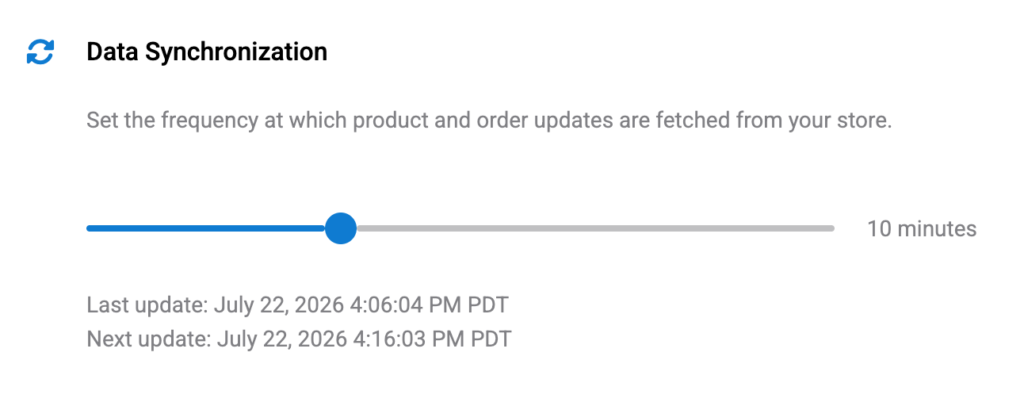
Poner el control deslizante en su valor mínimo de 0 minutos (zero) will disable automatic background updates. In this scenario, the only way to fetch updates would be the manual method explained above by pulling down to refresh (iPhone/iPad and Android apps) or clicking the refresh button (Web app) on the product, order or customer lists.
Please note that if you minimize or close the FooSales app, the background data updates will be suspendido para evitar un uso innecesario de batería y datos. Al restaurar o abrir de nuevo la aplicación de la tableta, se reanudarán las actualizaciones en segundo plano. Se realizará una comprobación de actualizaciones en cuanto la app vuelva a estar activa tras conectarse a su tienda y, a continuación, se realizarán comprobaciones posteriores con la frecuencia especificada.
Resetting Locally Stored Data #
If you want to clear all cached data on your device and redownload the latest data, you can do so simply by tapping the Reset en el botón Ajustes screen to remove all locally stored data and redownload your store data. This might take a few minutes and you won’t be able to use the app until the process is complete. After this FooSales will store the data locally on the device again.

 English
  German
  Dutch
Dutch  Spanish
  Italian
  Portuguese
  French
  Polish
  Czech
Czech  Greek
Greek