

Data is cached on your devices and updates are fetched either handmatig of automatisch op de achtergrond.
Snelle links #
Handmatige gegevensupdates #
If you pull down to refresh (iPhone/iPad and Android apps) or click the refresh button (Web app) on the product, order or customer lists, FooSales will perform a quick check to see if there have been any updates in WooCommerce to products or orders since the last time you manually refreshed the lists. Any new orders and updates to products or orders will automatically appear in the app and they will be cached on your device. Let op that only newly registered customers will be fetched with background data updates. Any changes made to existing customers from your WordPress admin dashboard or through other devices running FooSales POS will only appear on your device when resetting locally stored data.
Automatische gegevensupdates #
Als je wilt dat updates periodiek op de achtergrond worden opgehaald terwijl je de app gebruikt, kun je deze functie inschakelen door de frequentie in te stellen waarmee FooSales moet controleren op updates. Als je de Scherm Instellingen In de app is er een schuifregelaar waarmee je kunt instellen hoe vaak deze achtergrondupdates plaatsvinden.
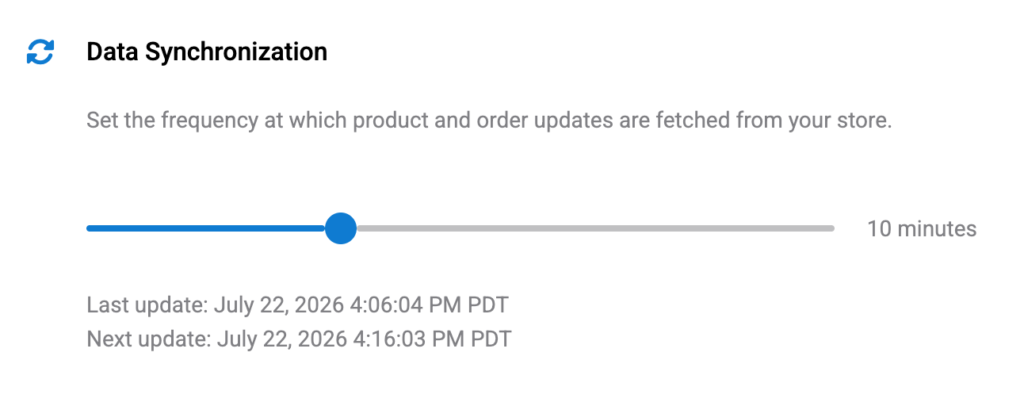
De schuifknop instellen op de minimumwaarde van 0 minuten (zero) will disable automatic background updates. In this scenario, the only way to fetch updates would be the manual method explained above by pulling down to refresh (iPhone/iPad and Android apps) or clicking the refresh button (Web app) on the product, order or customer lists.
Please note that if you minimize or close the FooSales app, the background data updates will be geschorst om onnodig batterij- en dataverbruik te voorkomen. Wanneer je de tablet-app herstelt of opnieuw opent, worden de updates op de achtergrond hervat. Er wordt een updatecontrole uitgevoerd zodra de app weer actief wordt nadat er verbinding is gemaakt met je winkel en daarna worden er volgende controles uitgevoerd met de opgegeven frequentie.
Resetting Locally Stored Data #
If you want to clear all cached data on your device and redownload the latest data, you can do so simply by tapping the Reset knop op de Instellingen screen to remove all locally stored data and redownload your store data. This might take a few minutes and you won’t be able to use the app until the process is complete. After this FooSales will store the data locally on the device again.

 English
  German
  Dutch
Dutch  Spanish
  Italian
  Portuguese
  French
  Polish
  Czech
Czech  Greek
Greek